Transform your phone into the ultimate mirror.
Convenient!
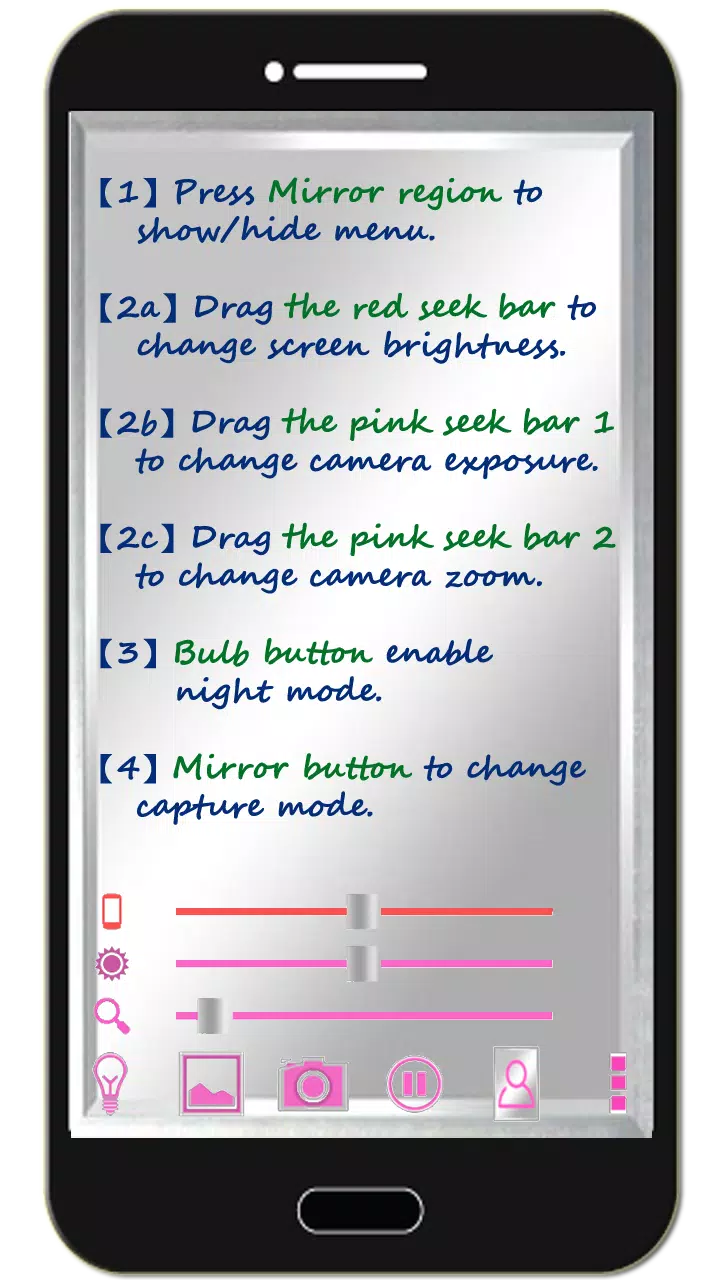
Tap the mirror area to toggle the menu.
Watch the tutorial video to learn how to use it.
[Tomorrow, I will meet... myself... yesterday.]
Mirror + Selfie Camera (best free mirror app)
Turn your phone into a flawless smart mirror.
Handy!
Tap the mirror area to show or hide the menu.
[Quick Mirror Camera Guide]
When the app starts, all menus are hidden for a true mirror experience.
Adjust settings using these methods:
1. Tap the mirror area to toggle the menu.
2. Slide the red bar to adjust screen brightness.
3. Slide pink bar 1 to modify camera exposure.
4. Slide pink bar 2 to zoom the mirror in or out.
5. Press the bulb icon to enable/disable night mode.
6. Press the mirror button to switch capture modes. ("Image on Mirror" or "Real Image")
7. Click pause/resume to freeze/unfreeze the image. Double-tap the frozen image to zoom, or pinch with two fingers.
8. [Volume Keys]: Use volume down to pause/unpause. Press volume up to capture images. More options available in settings.
[Additional Features]
1. Capture and edit mirror photos as desired.
2. Night mode: Tap the bulb icon to activate edge lighting.
3. The app keeps your screen on during use but auto-exits after 10 minutes of inactivity to save power.
【Recommended Photo Editor】
(Line Camera)
https://play.google.com/store/apps/details?id=jp.naver.linecamera.android
This compatible app offers user-friendly external photo editing.
Your device's built-in photo editor also works (tested on Samsung).
【Follow Us】
Support us with a Facebook like!
https://www.facebook.com/jkfantasy
What's New in Version 1.6.0
Last updated: May 26, 2020
V1.6.0:
1. Minor bug fixes.







![熊本のHairSalon YELLOW[ヘアサロンイエロー]](https://imgs.dgmma.com/uploads/78/173155007867355b7e469e0.webp)